I’ve been learning about CUDA C++ programming this week, following this blog post by Mark Harris. What makes CUDA useful is its ability to execute many computations in parallel instead of sequentially. The linked blog post demonstrates how it can add two very large vectors with a size of 1 million elements each. I’ll present the most interesting code snippets in an approachable way and show how very similar code can perform vector-vector dot products. You can see the full code in my repository here: https://github.com/davidnabergoj/cuda-programming.
Sequential addition
The sequential approach to adding two vectors is straightforward.
We simply iterate over all indices and add the values.
x and y are pointers to two arrays of size n.
void add(int n, float *x, float *y) {
    for (size_t i = 0; i < n; i++) {
        y[i] = x[i] + y[i];
    }
}
However, adding vectors this way only executes one addition at a time. Doing so in parallel would save us a lot of time, as we wouldn’t have to wait for previous additions to finish.
Parallel addition - single block
CUDA kernels are an extension of C++ code which are executed on the GPU.
We can change our previous function into a CUDA kernel by adding the __global__ keyword.
__global__ void add(int n, float *x, float *y, float *sum) {
    int index = threadIdx.x;
    int stride = blockDim.x;
    for (size_t i = index; i < n; i += stride) {
        sum[i] = x[i] + y[i];
    }
}
Our CUDA kernel accesses two global variables: threadIdx.x and blockDim.x that describe which thread is used for this computation.
When executing the kernel, we are essentially working with an array of threads called a block.
We want each thread to compute x[i] + y[i] for indices i in its part of the array.
We are essentially delegating work to different threads.
We can imagine threads in a block to be like construction workers in a team.
Suppose we have a block with four threads and \(n = 11\) elements in both our arrays.
This makes blockDim.x = 4. The value of threadIdx.x will be one of 0, 1, 2, or 3.
Let’s give each thread a color: orange for zero, blue for 1, green for 2, and purple for 3.
For a given thread with index threadIdx.x, the for loop will go through indices i = threadIdx.x + 0, i = threadIdx.x + 4, i = threadIdx.x + 8, etc.
The loop will stop once i goes beyond the bounds of the input arrays.
At each index, the thread will compute and store the sum of the two array elements.
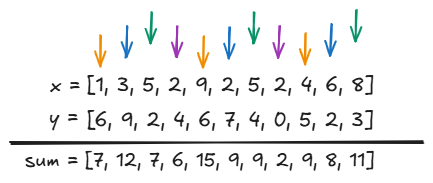
Since the threads are executed in parallel, each for loop will only take three iterations.
The purple thread with threadIdx.x = 3 will be done two iterations, while others need three.
This is in contrast to 11 iterations on the CPU program.
In this case, the CUDA approach will theoretically only need \(n / 4\) loop iterations.
Increasing the number of threads makes this even faster! With \(m\) threads, we only need \(n / m\) iterations.
This is great for very large vectors!
Parallel addition - multiple blocks
We can take our parallelization one step further by using multiple blocks in parallel. These blocks are arranged in a grid. Using our analogy from before, multiple blocks are like multiple teams of construction workers. The grid is like a construction site with multiple teams, each working on their own separate task.
__global__ void add(int n, float *x, float *y, float *sum) {
    int index = blockIdx.x * blockDim.x + threadIdx.x;
    int stride = blockDim.x * gridDim.x;
    for (size_t i = index; i < n; i += stride) {
        sum[i] = x[i] + y[i];
    }
}
The kernel code stays largely the same. The only difference is figuring out which parts of the array our thread should process.
The initial index for each thread is threadIdx.x - local to its block, offset by the total number of threads in all blocks before it.
The stride was previously equal to the number of threads in the block, meaning the for loop increments the index by the block size.
However, the new way of indexing requires that we increment the index by the sum of all block sizes.
You can check out the picture below for a visualization. Solid lines denote threads in block 1, while dashed lines denote threads in block 2.
I’m not showing the actual values of x and y, as there are too many :P
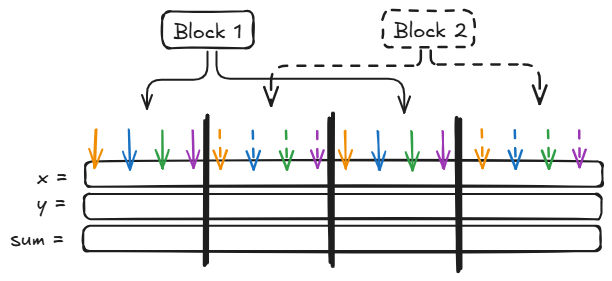
If we have \(B\) blocks with \(m\) threads each, we now only require \(n / (Bm)\) for loop steps! This makes parallel execution even faster.
Computing the dot product
Let’s look at another example: computing the dot product of two vectors.
Mathematically, the dot product is defined as \(a^\top b = \sum_{i = 1}^n a_i b_i\).
Translating this to C++ means looping over the elements and adding the products a[i] * b[i] to a result out.
In the code below, d is a pointer to a float.
void dot(float *a, float *b, float *d, size_t n) {
    float out = 0.0;
    for (size_t i = 0; i < n; i++) {
        out += a[i] * b[i];
    }
    *d = out;
}
How can we make this faster? We tell each block to compute a partial sum. The mathematical idea is \(a^\top b = \sum_{i = 1}^n a_i b_i = \sum_{j = 1}^k \sum_{i = 1}^m a_{jk+i} b_{jk+i} \) where \(j\) is an index over \(k\) blocks, and \(i\) is an index over \(m\) threads within each block.
#define BLOCK_SIZE 32

__global__ void dot_psum(float* a,
                         float* b,
                         float* p,
                         size_t n) {
    __shared__ float sdata[BLOCK_SIZE];  // the whole block can access this
    size_t tid = threadIdx.x;
    size_t idx = blockIdx.x * BLOCK_SIZE + threadIdx.x;
    sdata[tid] = (idx < n) ? a[idx] * b[idx] : 0;
    __syncthreads();  // wait until all threads in this block have written to sdata

    for (size_t s = BLOCK_SIZE / 2; s > 0; s >>= 1) {
        if (tid < s) {
            sdata[tid] += sdata[tid + s];
        }
        __syncthreads();
    }

    // Only allow thread 0 to write, otherwise we get race conditions and undefined behavior
    if (tid == 0) {
        p[blockIdx.x] = sdata[0];
    }
}
In the kernel above, p is a pointer to a float array which holds \( k \) partial sums.
We use an array called sdata with size \(m\) that is shared across all threads in a block.
Each thread writes its own product to sdata.
We use __syncthreads() to wait until all threads have successfully written to sdata.
We want to then sum all elements in sdata to create the partial sum.
We use a clever strategy which only needs \(O(\log_2 m)\) parallel iterations.
In each thread, we use a for loop to produce different offsets s.
If the thread index tid is less than the offset s, we look at the numbers in sdata[tid] and its offset counterpart sdata[tid + s].
We add sdata[tid + s] to sdata[tid].
After each loop step, we no longer have to look at sdata[tid + s], as its value has been accumulated into sdata[tid].
Check out the visualization for the first step, where we’re pretending to have a block of size \(m = 8\).
The accumulation is only performed by threads 0, 1, 2, and 3, because threads 4, 5, 6, 7 have index greater than s = 4.
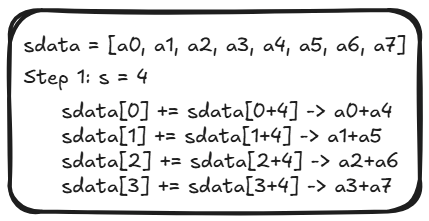
Afterward, we apply the reduction again.
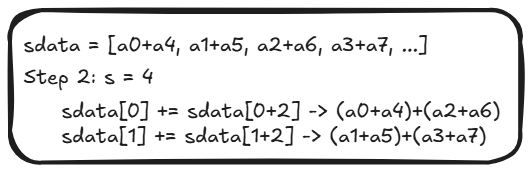
And again :)
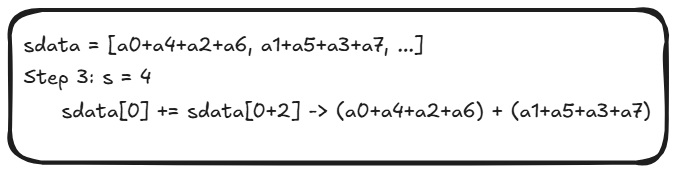
Now the entire sum is located in the first element of sdata and we can write it to the output array.
We’ll tell thread 0 of the block to do it, as having more than one thread trying to write to the same value will result in problems.
if (tid == 0) {
    p[blockIdx.x] = sdata[0];
}
Once all blocks have done this, the array of partial sums p is full.
What remains is to sum the partial sums.
A simple way of doing so is transferring the result back to the CPU and summing them sequentially.
float result = 0.0f;
for (size_t i = 0; i < blocks; i++) {
    result += p[i];
}
However, we can take it a step further and use a CUDA kernel to apply the final summation.
The code is very similar!
The only difference is we do not multiply two values when construcing sdata, but instead simply copy them over.
In this kernel, we use the input array of partial sums in as the output as well, effectively modifying it in place.
At the end, the result is stored in p[0].
__global__ void reduce_sum(float* in,
                           size_t n) {
    size_t tid = threadIdx.x;

    __shared__ float sdata[BLOCK_SIZE];
    size_t idx = blockIdx.x * BLOCK_SIZE + threadIdx.x;
    sdata[tid] = (idx < n) ? in[idx] : 0;
    __syncthreads();

    for (size_t s = BLOCK_SIZE / 2; s > 0; s >>= 1) {
        if (tid < s) {
            sdata[tid] += sdata[tid + s];
        }
        __syncthreads();
    }

    if (tid == 0) {
        in[blockIdx.x] = sdata[0];
    }
}
Thanks for reading! If you liked this post, you can support me on Ko-fi ☕. More CUDA coming soon :)